3D model of Kramatorsk — buy a printed city map
Want to buy a 3D model of Kramatorsk or order a map of your own neighbourhood? We print tactile maps from real OpenStreetMap data: streets, buildings with real heights, parks and water. Pick the area in the builder, preview it for free and order the print.
Maps from ≈€8, map keychains from ≈€4. Production takes 2–4 working days. You can also buy just the 3MF file to print yourself.
Kramatorsk is a city in Donetsk Oblast with 147,145 residents (2022) and about 1,902 people/km². Kharkiv lies 170 km to the north-west.
On a 3D map the city is recognised first by its water (Kazennyi Torets) — the anchors people look for first.
At 77 km² the whole city will not fit one model — people usually pick the centre or their own neighbourhood at 8–11 cm.
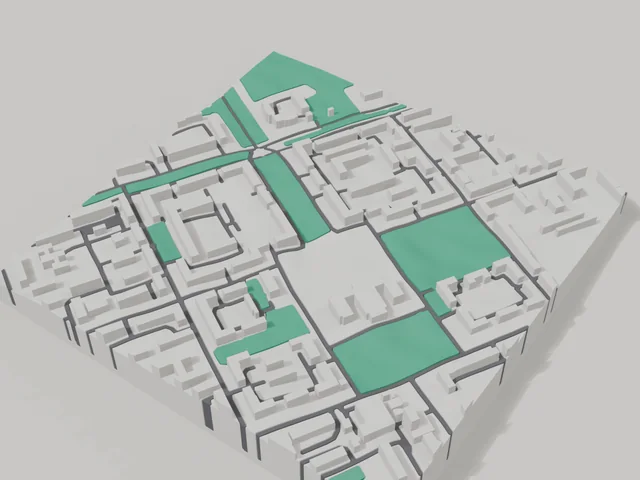
Kramatorsk was founded in 1868 on the Kazennyi Torets river and has been home to about 147 thousand people. The area for the 3D map is an 800 by 800 metre square in the centre: 126 buildings, 3.8 floors on average, the tallest at 9 floors. Large blocks with open space between buildings look airy on the model, and the squares and roads stand out.
The frame includes Shevchenko Square, Trade Unions Square, the Labyrinth square with its Scythian Gates and the City History Museum. Among the buildings is the museum of the Novokramatorsk machine building plant, which shaped the city's story. A map like this fits nicely on a shelf for people who work or grew up here. Buy a 3D model of the centre or order a map of your own district in the builder; the model preview is free.
Kramatorsk at a glance
- Population
- 147,145 (2022)
- Area
- 77 km²
- Density
- 1,902 people/km²
- Region
- Donetsk Oblast
- Water
- Kazennyi Torets
- Founded
- 1868
What your 3D model of Kramatorsk will show
An 800 × 800 m square around the centre of Kramatorsk holds about 126 buildings, each with its real height. The tallest building in frame has 9 floors, 3.8 on average.
What the area is like: low-rise blocks — streets and terrain show especially well; an open area with plenty of free space.
Green areas printed in a separate colour: Сквер афганців, Профспілок сквер, Сквер «Лабіринт», Сквер Шевченка.
Recognisable places inside the area: Тимчасовий розбірний Храм Святих Мучениць Віри, Надії, Любові та матері Їх Софії Української Православної Церкви (ПЦУ), Музей історії м. Краматорська, Т.Г. Шевченко, Скіфські ворота "Лабіринт", Музей історії ПАО "НКМЗ", Пам'ятник воїнам-афганцям.
Data: OpenStreetMap, 800 × 800 m area.
How to order a 3D map of Kramatorsk
- Open the builder — it starts right at the centre of Kramatorsk. Move the frame to your district, street or yard.
- Choose size and style (with or without relief) — the preview is ready in a few minutes.
- Order the print and enter the delivery details — we print it in 2–4 working days.
Prices — Kramatorsk
- Hartă 3D a orașului — S (≈5,5 cm)350 ₴ · ≈8 €
- Hartă 3D a orașului — M (≈8 cm)500 ₴ · ≈12 €
- Hartă 3D a orașului — L (≈11 cm)750 ₴ · ≈18 €
- Hartă 3D a orașului — XL (≈15 cm)1250 ₴ · ≈30 €
- Hartă 3D a orașului — 20 cm1650 ₴ · ≈40 €
- Relieful terenului (opțiune)+100 ₴
- Magnet de frigider cu hartă (≈6 cm)210 ₴ · ≈5 €
- Breloc cu hartă (imprimare 3D)de la 170 ₴ · ≈4 €
FAQ
- How many buildings will the 3D model of Kramatorsk have?
- An 8 cm map of an 800 × 800 m area holds about 126 buildings, the tallest with 9 floors. Resize or move the frame and the count changes — the builder preview shows the exact result.
- Will Тимчасовий розбірний Храм Святих Мучениць Віри, Надії, Любові та матері Їх Софії Української Православної Церкви (ПЦУ) be visible on the model?
- Yes — Тимчасовий розбірний Храм Святих Мучениць Віри, Надії, Любові та матері Їх Софії Української Православної Церкви (ПЦУ) lies inside the area shown for this page. Move the frame in the builder to put it right in the centre.
- How long does production take?
- Making a map or keychain with a Kramatorsk district takes 2–4 business days, then the model goes to shipping.
- Can I add text on the back?
- Yes — the back of a keychain or map can carry your own text: a name, a date, coordinates or a city name. The option is available in the builder before checkout.